
Helm Releases
A Helm Chart packages everything a Kubernetes service needs — Deployments, Services, Volumes — into a single, versioned bundle that you configure through values.yaml. A Helm Release is a running instance of a chart in your cluster with your specific configuration.
In lowcloud, you create Helm Releases directly through the Dashboard — no helm install or CLI access required.
Create a Helm Release
Navigate to Add Service → Helm Release.
- Enter the chart URL — Both OCI registries (
oci://) and HTTPS Helm repositories (https://) are supported. - Select a version — Choose the desired chart version.
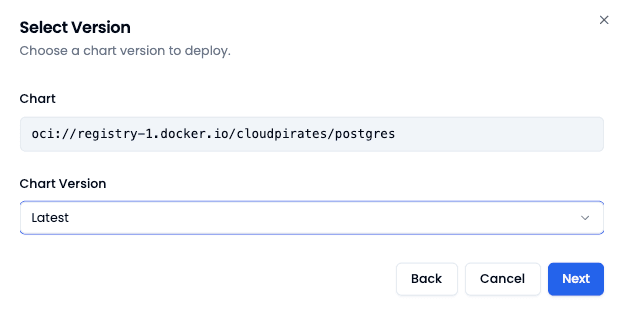
- Name your release — Give the Helm Release a descriptive name (e.g.
postgres-production). - Configure values — Adjust the
values.yamlto match your requirements.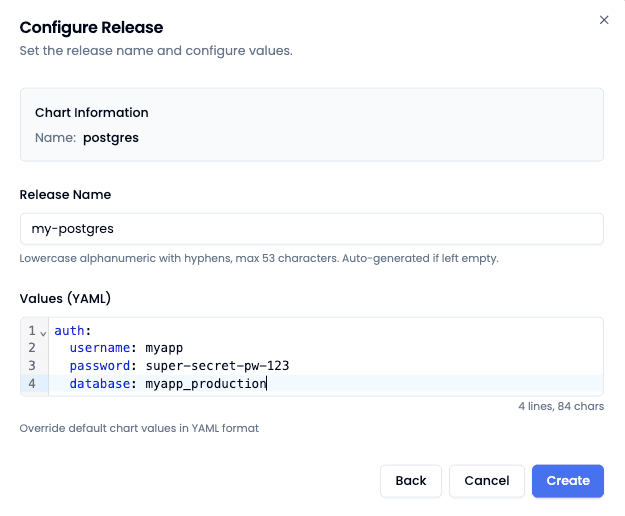
- Deploy — Open the created service and click Deploy. Wait until the label changes to "Deployed".
Helm Templates
Instead of entering a chart URL manually, you can select a Helm Template — pre-configured charts maintained by lowcloud with sensible default values. Available templates include PostgreSQL, Valkey, RustFS, OpenSearch, Keycloak, n8n, and more.
Features
Helm Release Dependencies
Many services depend on other services — for example, n8n requires a PostgreSQL database. With Helm Release Dependencies, you link releases together. lowcloud ensures that dependencies are started in the correct order and that services can discover each other.
Versioning
Each Helm Release is tied to a specific chart version. You can upgrade to a newer version at any time or roll back if issues arise.
Values
All configuration is done through Values — YAML parameters that control the chart's behavior, from database credentials and resource limits to persistence settings.
Tutorials
The following guides walk you through deploying popular services as Helm Releases step by step: